posting

what kind of trouble are you having exactly , are you getting any error types :huh:
 
That is the error message you will get when the picture (file) is too large. You have to reduce the picture's resolution and then you will be able to post it. When I take pictures with my camera, I set the camera's resolution to 600x800, so I don't have to reduce it later. I'm not sure if you can do that if you take a picture with your phone, but you probably can. See if you can set your camera's resolution lower and try again. Otherwise you have to reduce the pictures you already have. Hope this helps.
 
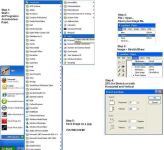
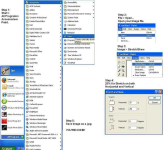
You may need to resize the image so you can post.

An old friend Ian gets credit for making this steps sheet on another forum :yes:
 

Attachments

  • steps.jpg.png
    steps.jpg.png
    556.3 KB · Views: 102
  • steps.jpg.png
    steps.jpg.png
    556.3 KB · Views: 96

Forum statistics

Threads
23,608
Messages
238,265
Members
3,803
Latest member
keyatt39
Back
Top